
On this page

JSON from logs, traces, and event streams is usually similar from row to row but rarely identical, and most analytical queries touch only a few of its paths. Counting 5xx responses, for example, needs one value: http.status.
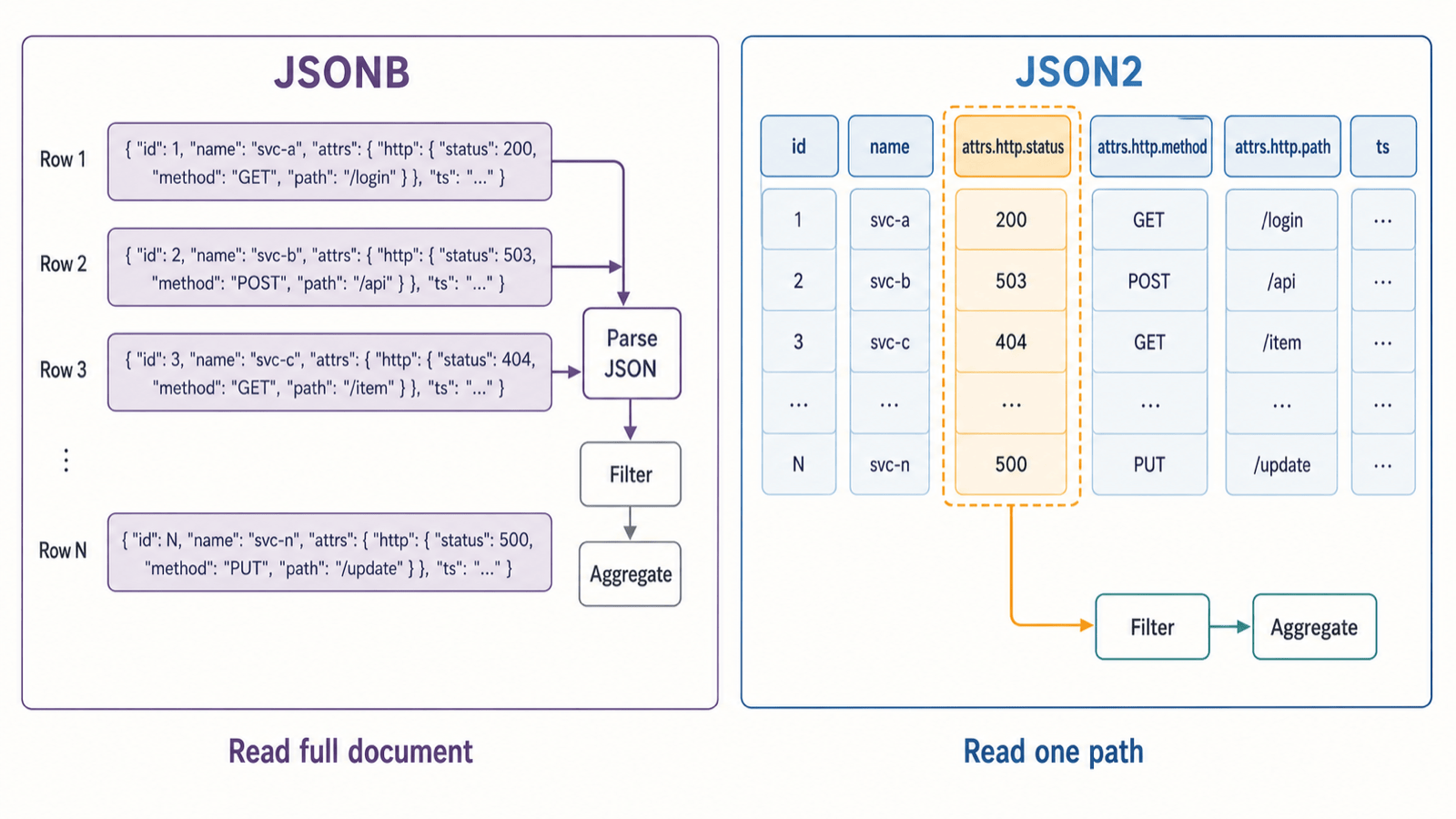
GreptimeDB's original JSON type encodes the whole document as JSONB and stores it as a single binary value. To read http.status, the storage engine reads the full JSONB value for every row, and the query engine then parses each one to find the field. The query needs one field; the engine reads and parses the entire document, so most of the I/O and CPU goes to fields the query never uses. JSONB is still a simple, reliable choice when you usually read whole objects, or when the schema is truly unpredictable. For log and trace analytics, it is expensive.
GreptimeDB 1.2 adds JSON2 for this kind of data. Users still see a complete JSON object, while the storage and query engines see structured data that can be pruned by path: frequently used paths are stored as their own columns, and a query can read only the columns it needs. This post starts with the limits of JSONB, then covers JSON2's layered storage, how it derives types from queries, and type hints. The examples in this post were run on v1.2.1, the latest stable release.
From whole-document JSONB to structured JSON
With JSONB, the unit of storage is the whole JSON document. Take the 5xx count:
sql
SELECT COUNT(*)
FROM application_logs
WHERE json_get_int(attrs, 'http.status') >= 500;
To the storage engine, attrs is a binary column. The query only needs http.status, but the storage engine has to return the full attrs value for every row so that http.status can be extracted from it. It cannot hand the query just the part it asked for.
Adding an index on JSONB is the usual answer. PostgreSQL's JSONBench results show how far that gets you.
PostgreSQL JSONB on JSONBench
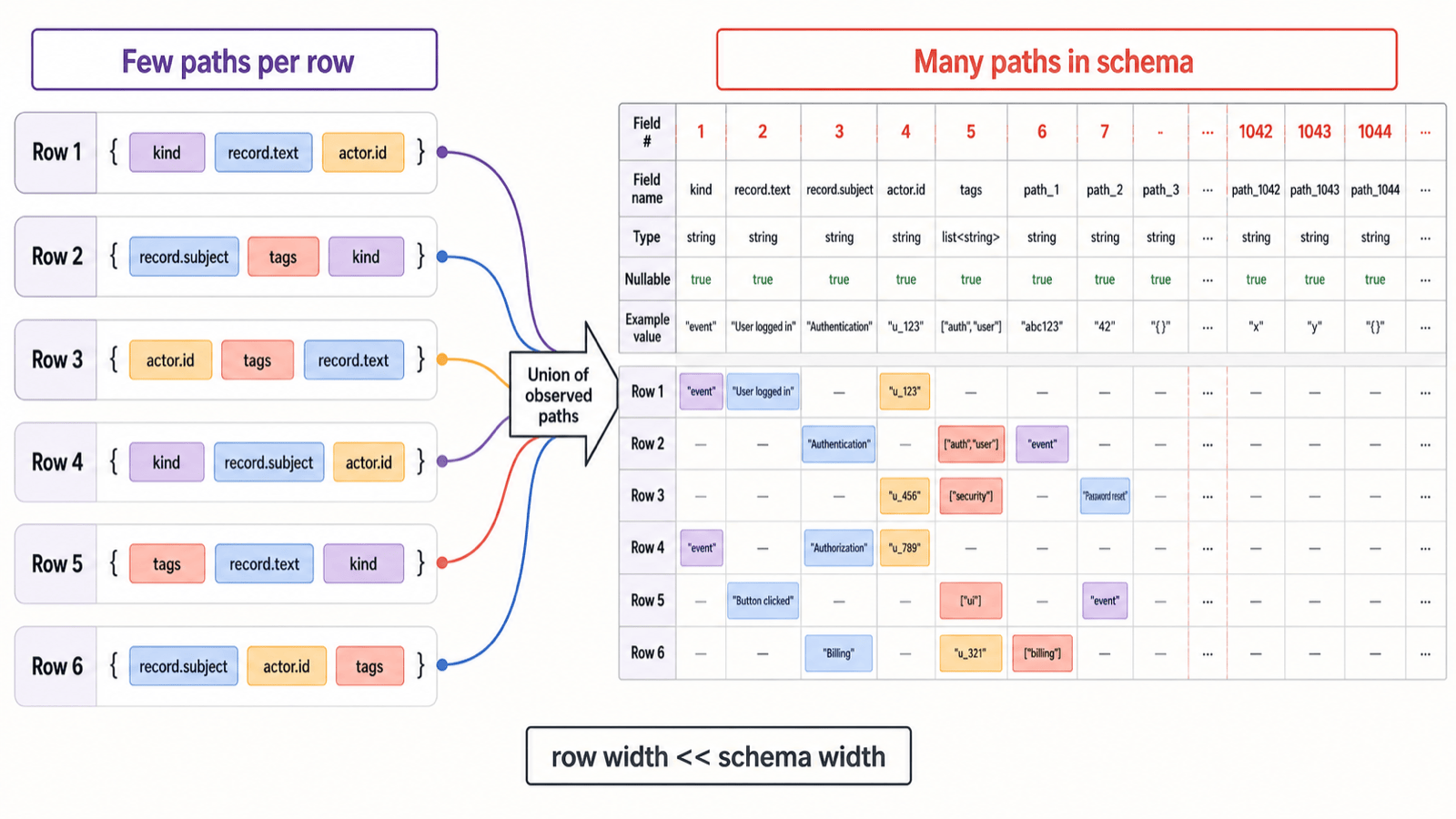
JSONBench benchmarks databases on roughly a billion real JSON events collected from Bluesky. The data has many fields, deep nesting, and a lot of schema variation between rows. The dataset as a whole contains a large number of distinct JSON paths, while any single row contains only a small fraction of them. It is wide, sparse, semi-structured data.
In the published results for PostgreSQL 16.6 on the 1-billion-row dataset, about 804 million documents were loaded. Data took about 512 GB on disk and indexes another 148 GB, for about 660 GB in total. The best of three runs for each of the five queries took between 1.1 and 1.4 hours (PostgreSQL JSONBench result).
These numbers say more about the workload than about the quality of PostgreSQL's JSONB or GIN implementation. An index tells you which rows might match; it does not change the fact that JSONB is stored as whole documents. After finding candidate rows, PostgreSQL still reads each JSONB value and extracts the target field. JSONBench queries scan or aggregate large numbers of matching rows, and PostgreSQL cannot read the values of a single JSON path the way a columnar database reads a column. Nor can it compress that path separately or process it with vectorized execution.
GreptimeDB's earlier JSONBench submission took a different approach: frequently used JSON paths were extracted into regular table columns. Query performance was good, but it cost extra storage and made the table less intuitive to use.
JSON2 is meant to avoid the problems of both: data is no longer stored as one JSONB binary value, and users do not have to extract common fields into table columns ahead of time.
JSON2: dynamic schema on top of a static columnar format
JSON2 stores JSON by expanding paths into separate columns, within limits, so that queries can use GreptimeDB's columnar storage and query engine.
The cost of going columnar: every JSON path can become a column
GreptimeDB's storage engine is built on Arrow and Parquet, and both assume a static schema. Every row in an Arrow StructArray shares the same set of fields, and a Parquet file records a fixed set of column definitions in its footer. JSON lets paths appear and disappear from row to row, and the same path can even change type. The first problem JSON2 has to solve is representing that dynamic structure inside static containers.
The most direct approach is shredding: turn each JSON path into a column that can be read on its own. Given these two documents:
json
{"kind":"post","record":{"text":"hello"}}
{"kind":"like","record":{"subject":"at://example/post/1"}}
an SST can store them with this physical structure:
text
Struct<
    kind: Utf8,
    record: Struct<
        subject: Utf8,
        text: Utf8
    >
>
A query on record.text reads only the corresponding Parquet column, with no need to parse or deserialize the full JSON. Each column is compressed separately, and filters and aggregations can run with vectorized execution.
Shredding makes reads fast, but it says nothing about how many columns you might end up with. When the JSON has a small set of stable fields, expanding every path works well. Real-world data like JSONBench can have thousands of paths, with each row containing only a few of them. Every new path adds a field to the Arrow schema and a column to the Parquet schema, and both quickly grow past what is manageable.
Stored this way, the cost of JSON depends on how many distinct paths the whole dataset has ever contained, not just on how many values each row writes. The number of JSON paths is unbounded; the physical schema has to be bounded.
JSON2 currently uses bounded automatic shredding: there is a cap on how many paths get their own column, so the physical schema cannot grow without limit. Paths beyond the cap are handled by the layered storage described next.
Layered storage: hot paths get columns, the long tail goes to the remainder
A JSON storage format needs to support two kinds of access. Frequently used paths should live in their own columns for predictable read performance. Everything else should go into a bounded shared area, so any new field can be written without the Arrow and Parquet schemas growing indefinitely.
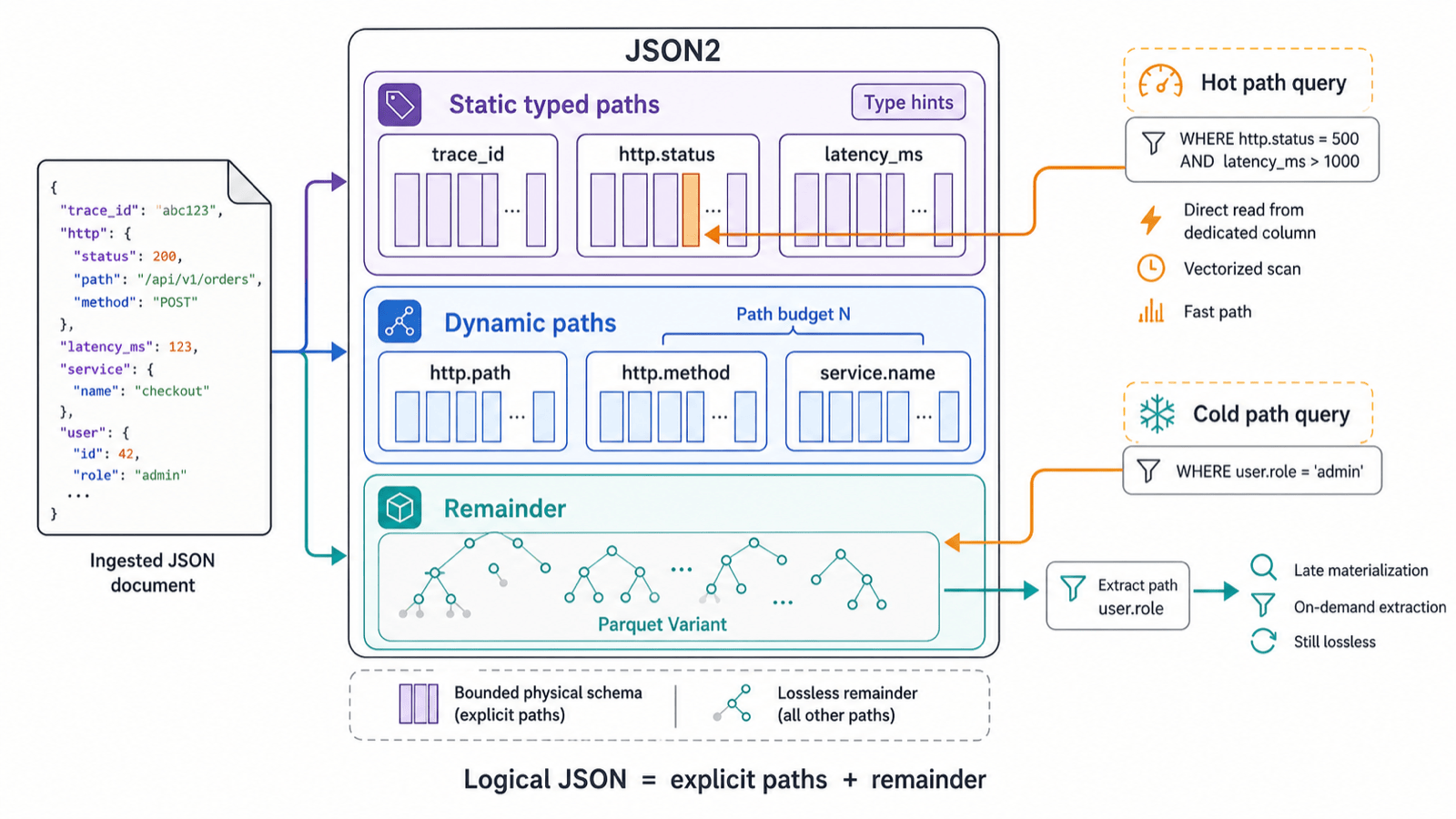
JSON2 sorts paths into three layers:
Static typed paths are declared explicitly with type hints. These are usually paths with a stable type that are queried often, and they always have their own Parquet column.
Dynamic paths are expanded automatically within a budget. They add columnar acceleration but are not guaranteed to stay fixed across the table.
Remainder paths are the long-tail fields beyond the budget. They are written to a standard Parquet Variant, which keeps their original nesting and value types.
Physically, the layout looks like this:
text
Struct<
    static typed fields,
    dynamic fields,
    remainder: Variant
>
The cap on automatically expanded dynamic paths (the "budget") is set by max_auto_expanded_paths and defaults to 100. It goes inside the JSON2 column definition, next to the type hints:
sql
attrs JSON2 (
    max_auto_expanded_paths = 0,
    trace_id STRING
)
With a budget of zero, only the paths declared through type hints get their own columns and everything else goes to the remainder. With a budget of N, the system expands at most N additional dynamic paths.
The remainder uses Parquet's Variant type, which is a different format from the old JSONB. A Variant column can hold values of different structures and types within a single bounded column. The cost is that querying a cold path means reading the remainder first and then extracting the value. JSON2 accepts that cold-path cost for now in exchange for three properties: the physical schema is bounded, long-tail fields are never dropped, and hot paths can still be pushed down to Parquet.
In GreptimeDB 1.2, type hints and the budget can only be set when the table is created. The ALTER TABLE ... MODIFY COLUMN syntax for changing the settings of an existing JSON2 column has been merged into the main branch (#9029) but is not in 1.2.x. Once it is available, a cold path that becomes frequently queried can be promoted to a static typed path.
Whichever layer a path ends up in, the static typed fields, dynamic fields, and remainder together make up the complete JSON document, and no path appears in more than one of them.
Query type concretization: letting the query decide the structure
Layered storage covers how JSON is written. The query engine still needs to know how to read it. A query planner normally starts from the table schema, so reading JSON as structured data would require its structure to be part of the table metadata. But JSON structure is dynamic and hard to represent consistently in static table metadata.
JSON2 instead derives the structured type it needs for planning directly from the SQL. We call this query type concretization. The query engine collects two things from the SQL:
which JSON paths the query accesses;
what SQL type each path is expected to return.
For example:
sql
SELECT data.commit.collection FROM bluesky WHERE data.time_us > 1720000000000000;From this, the query engine can infer that the query needs only commit.collection and time_us. The first can be a string; the second is used in an integer comparison. So the structured type for the data column is:
text
Struct<
    time_us: Int64,
    commit: Struct<
        collection: Utf8,
    >
>
That type is all the query engine needs to run the query. Given the same type, the storage engine can read only the columns for those paths from the SST.
The fundamental limitation is that the inferred types come entirely from SQL expressions. For dynamic data whose types vary from row to row, returning NULL when a row's value cannot be converted to the inferred type is reasonable. The problem is that the inference itself can be wrong. Suppose the query above is accidentally written as:
sql
SELECT data.commit.collection + 1 FROM bluesky WHERE data.time_us > 1720000000000000;The + 1 leads the query engine to infer a numeric type for commit.collection, even though every actual value is a string, so the query returns nothing meaningful. Type hints address this.
Type hints: fixing the type of a JSON path
When you define a JSON2 column, you can declare fixed types for specific JSON paths. In the table below, the attrs column has four path type hints:
sql
CREATE TABLE application_logs (
    ts TIMESTAMP TIME INDEX,
    attrs JSON2 (
        trace_id STRING,
        http.status BIGINT,
        latency_ms DOUBLE,
        error BOOLEAN DEFAULT false
    )
) WITH (
    append_mode = 'true'
);
A table with a JSON2 column must set append_mode = 'true'; otherwise CREATE TABLE fails.
Type hints are static and are stored in the table schema. When the query engine infers the structured type of a JSON column, it uses the type hints. In the following query, attrs.http.status is read as BIGINT according to its type hint and then compared with the integer 200:
sql
SELECT attrs.trace_id FROM application_logs WHERE attrs.http.status = 200;A JSON path with a type hint is always stored as a static typed path (see the layered storage section above), with its own column and the best read performance. We recommend adding type hints for fields that have a stable type and are queried often.
Type hints also come with a constraint: JSON2 rejects writes where a hinted field has a value of the wrong type. For example, this insert writes http.status as a string:
sql
INSERT INTO application_logs VALUES
(3, '{"trace_id":"8f3a1e","http":{"status":"oops"},"latency_ms":1.0}');
It fails with:
text
Invalid JSON: JSON value at http.status does not match JSON2 type hint Int64SQL syntax: accessing JSON like a regular struct
The most direct way to access JSON2 is dot syntax:
sql
SELECT
    attrs.trace_id,
    attrs.http.status,
    attrs.latency_ms
FROM application_logs
WHERE attrs.http.status >= 500;
JSON paths can appear in SELECT, WHERE, GROUP BY, and ordinary expressions. Comparisons and arithmetic also give query type concretization the expected types.
When you need exact control over the return type and want to avoid meaningless queries, use json_get with a cast:
sql
SELECT
    json_get(attrs, 'http.path')::STRING AS path,
    AVG(json_get(attrs, 'latency_ms')::DOUBLE) AS avg_latency_ms
FROM application_logs
GROUP BY json_get(attrs, 'http.path')::STRING;
Both forms have the same query capabilities. Dot syntax suits fixed, readable field paths; json_get suits explicit type conversion and generated queries.
A complete example:
sql
CREATE TABLE application_logs (
    ts TIMESTAMP TIME INDEX,
    attrs JSON2 (
        trace_id STRING,
        http.status BIGINT,
        latency_ms DOUBLE,
        error BOOLEAN DEFAULT false
    )
) WITH (
    append_mode = 'true'
);

INSERT INTO application_logs VALUES
(
    1,
    '{"trace_id":"8f3a1c","http":{"method":"POST","path":"/v1/orders","status":200},"latency_ms":42.8}'
),
(
    2,
    '{"trace_id":"8f3a1d","http":{"method":"POST","path":"/v1/orders","status":500},"latency_ms":71.2,"error":true}'
);

SELECT
    attrs.http.path AS path,
    COUNT(*) AS requests,
    SUM(CASE WHEN attrs.error THEN 1 ELSE 0 END) AS errors
FROM application_logs
GROUP BY attrs.http.path;
Expected output:
text
+------------+----------+--------+
| path       | requests | errors |
+------------+----------+--------+
| /v1/orders |        2 |      1 |
+------------+----------+--------+
Both path and error are fields inside the JSON, but filtering and grouping operate on values with concrete SQL/Arrow types. Nothing has to deserialize a full JSONB document row by row.
Summary and next steps
JSON2 lets GreptimeDB store and read JSON as structured data: paths with type hints, and paths that were automatically expanded, are read the same way as regular columns. It is a good fit for logs and traces in observability workloads.
GreptimeDB's current JSONBench results come from an ingestion pipeline that expands common JSON paths into regular table columns. That approach performs well, but it does not preserve the original JSON nesting, so JSONBench labels it "flatten". It was a trade-off made for performance. In our latest tests, JSON2 matches that earlier implementation on JSONBench. We are still working on JSON2 read performance, and after we submit new JSONBench results we will publish a separate performance comparison.


