
On this page

We released GreptimeDB v1.3.1 on November 13, 2026. It is a maintenance release for v1.3 that mainly fixes bugs, performance problems, and security issues found since v1.3.0.
We recommend all v1.3.0 users upgrade. v1.3.0 can be upgraded to v1.3.1 in place; a few cases need attention, listed in the upgrade notes below.
Write Reliability
- Fixed a case where some written data could be lost when a repartition rolled back or a datanode restarted.
- Fixed the periodic local WAL sync not reaching disk under the default configuration.
Permissions and Credentials
- Switching databases over HTTP, MySQL, or PostgreSQL checks whether the user can access that database.
- Administrative functions require
ADMINprivileges, including when called throughSELECT. - Diagnostic configuration output, startup logs, and table options no longer show passwords or other credentials.
- The PostgreSQL protocol dependency is upgraded to fix a TLS security issue.
Query Results
- Fixed MySQL and PostgreSQL prepared statements returning incorrect results after partition columns change, including prepared
INSERT ... SELECTwriting incorrect rows. - Fixed several incorrect PromQL results, such as calculations over duplicate samples at the same timestamp.
- Picked up several upstream DataFusion fixes for incorrect join results and stuck queries.
Performance
- Fixed slower reads for PromQL queries over long time ranges.
- Fixed compaction failing to finish in some cases.
- Distributed join queries read less data, so joins on fields such as
trace_idrun faster.
Dashboard
The Dashboard is updated to v0.14.6. The Traces view in Signals Explore adds a Service Map that shows live calls between services, built on the semantic layer.
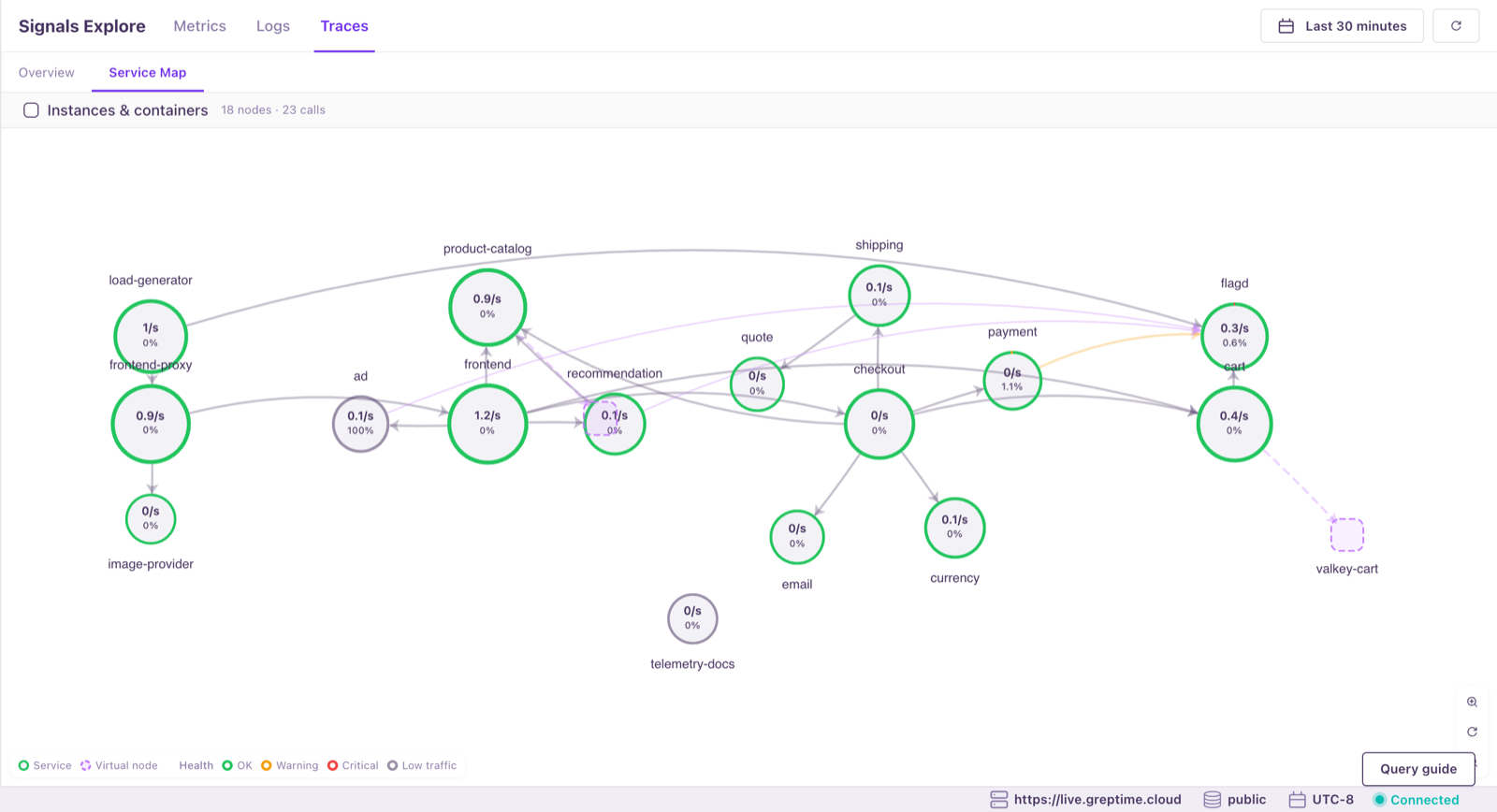
You can try it on our live demo at live.greptime.cloud, which runs v1.3.1 with the OpenTelemetry Demo writing metrics, logs, and traces.
Upgrade Notes
v1.3.0 can be upgraded to v1.3.1 in place. Back up your data and configuration first. Watch for these cases:
- MySQL applications that connect without specifying a database and lack access to the default
publicdatabase mustUSEa database they are authorized for before running queries. - PostgreSQL applications must connect to a database that exists and that they are authorized for; otherwise the connection is rejected.
- Tables read through Prometheus Remote Read need string-typed label columns; otherwise the read returns an error. Label matching now follows Prometheus semantics (regular expressions match the full string, and missing or NULL labels match as empty strings), so existing queries can return different results.
- If you manually set sparse primary key encoding on a table (
memtable.partition_tree.primary_key_encoding = 'sparse'), check its schema against #10020 before upgrading.
See the release notes for other compatibility notes, including distributed deployments and log ingestion.
Get v1.3.1
For a standalone Docker deployment, the image is greptime/greptimedb:v1.3.1. To upgrade from v1.3.0, stop and remove the old container, then start the new image with your existing startup options and data directory. With the default configuration:
shell
docker run -p 127.0.0.1:4000-4003:4000-4003 \
  -v "$(pwd)/greptimedb_data:/greptimedb_data" \
  --name greptime --rm \
  greptime/greptimedb:v1.3.1 standalone start \
  --http-addr 0.0.0.0:4000 \
  --grpc-bind-addr 0.0.0.0:4001 \
  --mysql-addr 0.0.0.0:4002 \
  --postgres-addr 0.0.0.0:4003
See the installation docs for other deployment methods.
Installation packages and the full changelog are on the GitHub Release. If you run into problems, please report them on GitHub Issues.
Thanks to the 19 contributors to this release, 6 of whom contributed for the first time. See the full contributor list.


